Data Science Pipeline in a Small SaaS: Architecture from Zero to Production
How to build an efficient data science pipeline in a small SaaS company? A practical guide to architecture, tools, and challenges for teams of 1-2 engineers.
Why small SaaS companies need a different approach to pipelines
Corporate data science pipelines are war machines – dedicated teams, Kubernetes clusters, Kafka streams processing petabytes. In a small SaaS, you have two developers who do analytics "on the side," a $50/month VM, and data from five different sources in three formats. This is a fundamentally different game.
Small SaaS realities: constraints define architecture
Typical scenario: data from Stripe in JSON, application logs in plaintext, user events in PostgreSQL, support tickets in Zendesk, and marketing wants dashboards "yesterday." You don't have the luxury of a dedicated data engineer – the pipeline must work on its own, or not at all. Research shows that small teams need distinct strategies from enterprises, with emphasis on automation and modular design [7].
The key difference? In a corporation, you optimize for scale and compliance. In a small SaaS, you optimize for developer time and infrastructure cost. Your pipeline must be simple enough that a junior developer can debug it at 3 AM when something breaks.
Three challenges that kill pipelines in small companies
First: distributed data sources without a unified schema. Every SaaS tool has its own API with its own rate limits and quirks. Stripe returns timestamps in Unix epoch, Zendesk in ISO 8601, and your application in "whatever the developer thought was good in 2019." The lack of standards forces a normalization layer that in a corporation is "nice to have," but for you is "must have" [7].
Second: zero tolerance for downtime with zero budget for redundancy. When pipelines fail, business decisions are made on gut feeling instead of data. But you can't afford hot standby and automated failover – you must build reliability through simplicity, not through infrastructure duplication.
Third: data volume grows faster than the team. Today you process 10GB daily, in a year it will be 100GB, in two years 1TB. Full reload of the entire dataset stops being an option at 50GB+ [1]. You need incremental loading from day zero, not as a "future optimization."
Foundation: automation + modularity + incremental loading
An effective pipeline in a small SaaS stands on three pillars. Automation eliminates manual work – no CSV exports, no manual job triggering. Everything must run on schedule or event-driven [1].
Modularity means that each pipeline stage (extraction, transformation, loading) is an independent component. When Stripe changes their API, you replace one module, not rewrite the entire system. Data partitioning, load balancing, and queue-based architectures aren't buzzwords – they're concrete techniques for managing growing volume without rewriting code [1].
Incremental loading is non-negotiable. Instead of "fetch all data from the beginning of time," you fetch only changes since the last run. This is the difference between a pipeline that runs for 5 minutes and one that blocks the system for 3 hours. In practice: timestamps, watermarks, CDC – mechanisms for tracking "what we've already processed" [1].
Without these three elements, you're building technical debt that in a year will cost more than rewriting everything from scratch.
Layered architecture: from raw data to insights
In a small SaaS, pipeline architecture isn't rocket science – it's three layers that you must design well from the start so you don't have to rewrite in six months.
Source Layer: API as single source of truth
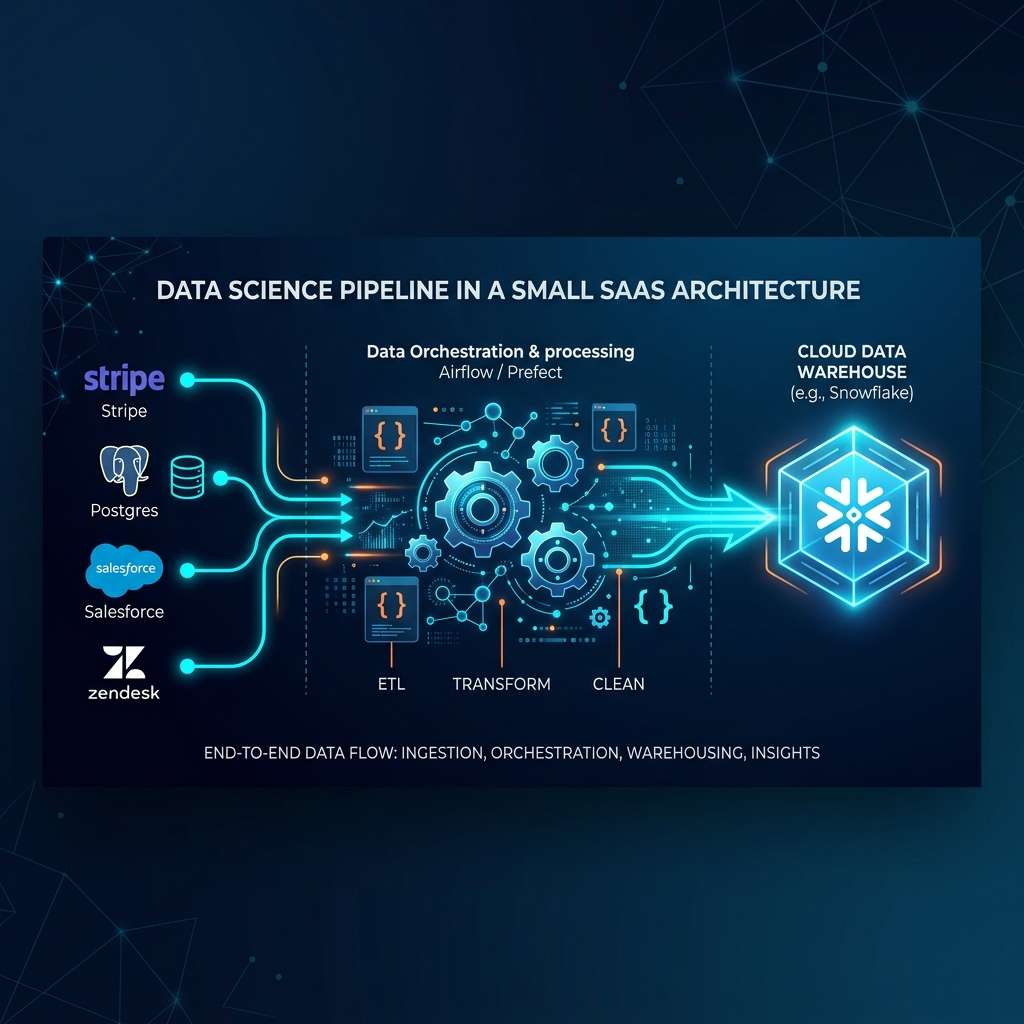
Your raw data sits in Salesforce (CRM), Stripe (billing), Zendesk (support). Instead of scraping databases, you connect to these tools' APIs. In practice: Python scripts in Docker containers that pull data through REST APIs every night (or every hour). Key question: batch or streaming? If you're doing monthly financial reports – batch is enough. If you need real-time fraud detection – you must go streaming with CDC (Change Data Capture) [4].
Processing Layer: where magic (and errors) happen
Here cleaning, validation, and format standardization occur. Salesforce returns dates in one format, Stripe in another – you must unify this. You add business rules: "trial ends after 14 days," "churn is no payment for 60 days." In a small team (1-2 data engineers), DBT is the standard for SQL transformations, Airflow for orchestration [3]. You don't write custom Python parsers – you waste time on debugging instead of building models.
Destination Layer: analytics vs operations
Data lands in two places. Analytics platforms (Snowflake, BigQuery) are warehouses for ad-hoc queries, dashboards, exploration by analysts. Operational databases (Postgres, MongoDB) are engines for production ML models – this is where features go that the API returns in milliseconds to the application [3]. Beginner mistake: keeping everything in one place. Snowflake is great for analytics, but you won't serve predictions from it in real-time.
Batch vs streaming: latency decides
Batch: you process data every night, you have 12-24h delay, but infrastructure is simple and cheap. Streaming: sub-second latency, but you need Kafka/Kinesis, 24/7 monitoring, queue-based architecture to avoid overloading the system [4]. In practice: start with batch for reports and historical analyses. Add streaming only where business pays for real-time – offer personalization, payment anomaly detection. Most small SaaS companies don't need streaming at the start, and premature optimization kills projects.
Technology stack for a small team: what actually works
When you have a team of 1-2 engineers and a budget that doesn't allow for an army of DevOps, choosing a stack is a survival game. There are dozens of combinations used in small SaaS companies, but only a few configurations survive the first deploy and don't crash at 3 AM.
Apache Airflow: orchestrator that doesn't require a PhD
Airflow is the de facto standard for batch ETL in small teams [6]. Why? Because DAGs in Python are something every data scientist can grasp in a weekend. You manage both classic batch jobs (nightly aggregations, financial reports) and event-triggered workflows – e.g., trigger after uploading a file to S3 or a webhook from Stripe.
Key advantage: you have control over scheduling, retry logic, and dependency management without writing your own framework. In practice: instead of cron jobs scattered across 5 servers, you have one UI where you see what crashed and why. Airflow on a single VM with 8GB RAM will easily handle 50+ daily DAGs for a SaaS with $1-2M ARR.
DBT: end of brittle Python scripts
DBT (Data Build Tool) is a game-changer for data transformations [6]. Instead of Python parsers that break with every schema change, you write SQL with version control, tests, and documentation. For a small team, this means: a junior can review transformations because it's readable SQL, not nested pandas operations.
I've read about companies that reduced transformation development time by 60% after switching from custom Python scripts to DBT. Bonus: automatic generation of data lineage – you know which dashboards will crash if you change a source table.
Docker + VM vs managed services: real trade-offs
There's no golden mean here. Docker on VM (AWS EC2, GCP Compute Engine) gives full control and costs ~$100-300/month for basic setup [6]. Managed services like Databricks or Matillion are $1000+ monthly, but zero maintenance.
My practical rule: if you have <2 engineers and no dedicated DevOps – go managed until the pain of payments exceeds the pain of managing infrastructure. For most small SaaS companies, that's the ~$50K MRR threshold. Below that, Docker + single VM + managed database (RDS, Cloud SQL) is the sweet spot – flexible enough, doesn't kill cash flow.
Monitoring: automatic detection before the client writes a ticket
A pipeline without monitoring is Russian roulette. Minimum is automated alerting on pipeline failures and data quality issues [6]. Specifically, you need:
- Data freshness checks: alert when data hasn't loaded on time (SLA breach)
- Volume anomalies: 50% drop in daily records = something broke in source API
- Schema validation: new column in API response will crash your pipeline without warning
- Business metrics: monitoring key KPIs (Net New ARR, churn) at the pipeline level [1]
In practice, I use a combination: Airflow alerts (pipeline-level), DBT tests (data quality), CloudWatch/Stackdriver (infrastructure). Cost: ~$50/month, savings: hours of debugging and saved reputation with the client.
Key lesson: in a small team, every failure is lost development hours. Better to overinvest in monitoring than in a third engineer who will be firefighting.
Implementation in practice: small SaaS company case study
In a small SaaS company with a team of 1-2 data engineers, a typical pipeline looks like this: Python scripts pull data from APIs (Salesforce, Stripe, Zendesk), DBT transforms them in an intermediate layer, and Airflow orchestrates everything on VMs or in Docker [6]. This is a three-layer architecture: source → processing → destination (Snowflake, BigQuery) [3]. No fancy solutions – just a proven configuration that can be set up in a weekend.
The key to survival with growing volumes is incremental loading. Instead of processing 100GB of historical data daily, you load only the delta – the last 2GB of changes [3]. Partitioning by time (day/week), geographic region, or customer segment allows parallel data processing and avoids bottlenecks [3]. In practice: a user_events table partitioned by event_date and region_id – each partition is a separate job in Airflow.
Queue-based architecture saves lives during traffic spikes. When the API suddenly gets 10x more requests (Black Friday, product launch), the queue buffers data instead of crashing the system [3]. Kafka or RabbitMQ as a buffer between source and processing – simple thing, but the difference between 99.9% and 95% uptime. Load balancing adds another layer of protection, distributing processing between servers [3].
Monitoring is not an option – it's a necessity. SLA for data freshness (e.g., CRM data no older than 4h), alerts on pipeline failures, automatic retry for transient errors [3]. Small SaaS companies often track Rule of 40 (growth + profitability > 40%) and Net New ARR – without a working pipeline, these metrics sit in Excel instead of a dashboard [5]. Airflow + DBT + basic monitoring is the minimum viable infrastructure that scales to hundreds of GB of data monthly without rewriting from scratch [6].
Metrics and SLA: how to measure pipeline success
Most small SaaS companies measure pipeline success through the lens of "works/doesn't work." That's not enough. You need specific SLAs and metrics that connect infrastructure with business.
Data freshness as a hard contract
Start by defining what "fresh data" means in your context. For a C-level dashboard, a 24h delay may be acceptable. For an anti-fraud system - a few seconds maximum [5]. In a small SaaS, typical setup is:
- Batch pipelines for financial reports: 12-24h SLA
- Streaming for user events: sub-second latency through CDC [5]
- DBT transformations: refresh every 6h for analytical models
Set alerts not only on failure, but also on exceeding SLA by 20%. If nightly processing starts finishing at 8:00 instead of 6:00, it's a signal that infrastructure isn't keeping up with data growth [3].
Business metrics in the pipeline
In SaaS, the pipeline doesn't exist in a vacuum - it must deliver specific numbers for decision makers. Key metrics are:
- Rule of 40: sum of growth rate and profit margin above 40% [5]
- Net New ARR: sum of new customers, expansion, and churn in one number
- Retention cohorts: automatic tracking of how customers from a given month behave over time
- Sales funnel efficiency: conversion rates between stages, not aggregates
Instead of manually updating spreadsheets, build metric trees - unified models in DBT where each metric has a clear definition, ownership, and lineage [3]. When the CFO asks about MRR, everyone looks at the same number from the same source.
Benchmarking for growing volumes
Monitor not only whether the pipeline works, but how its performance scales. Track:
- Processing time per 1GB of data
- Infrastructure cost per 1000 events
- Memory footprint during peak load
When you see degradation (e.g., processing 10GB takes 3x longer than proportionally to 5GB), it's time for optimization. Typical solutions: data partitioning by time or client, incremental loading instead of full refresh, load balancing between instances [3]. In a small SaaS, most often it's enough to switch from daily full refresh to incremental - this step alone can speed up the pipeline 10x with growing volumes [3].
Set threshold alerts: "if processing time exceeds X at volume Y, consider scaling." This gives you time to react before the pipeline starts missing SLA.
Common pitfalls and proven solutions
In small data science teams, every third pipeline fails due to the same mistakes. I've seen hundreds of projects where "worked on my laptop" ended in 3 AM debugging sessions.
Manual errors eat 40% of team time
Biggest problem: engineer writes a script, tests locally, deploys to production via SCP. A week later, no one remembers what the script does or why those particular parameters. The solution is brutally simple: automation + modular design. Each pipeline component is a separate module with a clear interface. Docker container with versioned code, Airflow for orchestration, zero manual interventions [6].
Brittle ad-hoc scripts are a time bomb
Classic: Python parser in 300 lines that "sometimes crashes but just click through." The problem grows exponentially with each new data source. DBT with version control completely changes the game [6]. SQL transformations in a Git repository, code review before merge, rollback in 30 seconds. Instead of debugging Python at 2 AM, you have readable DAGs and automatic tests.
Data silos = blind decisions
Sales has its dashboards in Salesforce, marketing in Google Analytics, support in Zendesk. No one sees the full customer picture. Integration through a unified ETL pipeline gives real numbers: customer lifetime value calculated from actual billing data + support tickets + engagement metrics [1]. One source of truth, one version of truth about churn.
Pipeline overloads come suddenly
Today you process 10GB daily, in a month 100GB. The pipeline starts choking, reports are 6 hours late. Queues + incremental loading save the situation without rewriting everything [1]. Queue-based architecture buffers traffic spikes, incremental loading processes only new data instead of full refresh. Data partitioning by time or customer segments + load balancing between servers [1].
Signals it's time to scale infrastructure
Three red flags: (1) pipeline jobs regularly exceed time window, (2) compute costs grow faster than ARR, (3) team spends more time on maintenance than on new features. Then you migrate from VM to managed services like Databricks or distribute workload through Kubernetes [6]. Key metric: if Rule of 40 (growth rate + profit margin) drops due to data problems, infrastructure is hampering business.
Practical checklist: from concept to production
Phase 1: Planning (week 0-1)
Before you write the first line of code, define hard metrics. Not "we'll improve personalization," but "we'll increase CTR by 15% in 3 months." Establish latency requirements: nightly batch (several hours) is enough for financial reports, but fraud detection needs sub-second latency [4]. Write this in a requirements document – it will be the reference point for every architectural decision.
Define SLA for data freshness. For a small SaaS, typical is: CRM data refreshed every 6h, application logs in real-time, financial data once daily. Also set a budget: how much you can burn monthly on infrastructure and how many team hours maintenance will consume.
Phase 2: Stack selection (week 1-2)
In a small SaaS, priority is managed services over custom infrastructure [6]. Instead of setting up your own Kubernetes, use AWS Batch or Cloud Run. Instead of writing parsers in Python, take DBT for SQL transformations [6].
Basic stack for starting:
- Ingestion: Airbyte/Fivetran for SaaS connectors (Stripe, Salesforce)
- Storage: BigQuery/Snowflake – you pay per query, not for VMs
- Transformation: DBT – versioning transformations in GitLab
- Orchestration: Airflow on managed service (Cloud Composer, MWAA)
- Monitoring: Datadog/New Relic with alerts to Slack
Don't build a streaming pipeline right away. Start with batch – 90% of use cases in small SaaS are nightly report processing, customer segmentation, churn prediction [4]. You'll add streaming when you have a concrete case requiring real-time.
Phase 3: MVP implementation (week 3-6)
First pipeline: one source → one transformation → one dashboard. Example: data from Stripe API → MRR aggregation → chart in Metabase. Deploy in Docker on one VM, orchestration through cron job.
Key techniques from the start:
- Incremental loading – don't process entire history daily, only delta from last run [7]
- Data partitioning – divide data by date/customer so queries are faster [7]
- Idempotency – pipeline run 2x on same data gives same result
Add features iteratively: first basic ETL, then data quality checks, later feature store for ML. Each iteration = 1-2 weeks, deploy to production, collect feedback.
Phase 4: Monitoring and maintenance (from day 1)
Automatic alerts for 3 scenarios: pipeline failure, data quality issues, SLA breach. Use queue-based architecture to buffer traffic spikes [7] – Kafka/RabbitMQ as a layer between ingestion and processing.
Document in Notion/Confluence: data dictionary (what each column means), runbooks (what to do when pipeline fails), architecture decision records. Disaster recovery: daily database snapshots, backup of Airflow DAGs in GitLab, procedure to restore environment in <4h.
Monitor costs weekly. In a small SaaS, it's easy to spend $2k monthly on BigQuery because someone forgot to add a WHERE clause in a query materializing 500M rows.
Phase 5: Scaling (month 6+)
Signals it's time for upgrade:
- Pipeline takes >6h, blocks morning reports
- Infrastructure costs grow faster than ARR
- Team spends >20% of time on firefighting
Then switch to: Kubernetes for dynamic scaling, Spark for processing TB+ data, streaming pipeline for real-time features. But not earlier – premature optimization is the main killer of small DS projects.
References
- Data Pipeline Optimization: Control Over When Your SaaS Breaks
- Self-managed vs SaaS - UbiOps - AI model serving, orchestration & training
- Data-Driven Decision Support in SaaS Cloud-Based Service Models
- What Is a Data Pipeline: Bridging Raw Data and Business Value
- Data Pipeline Architecture Explained: 6 Diagrams And Best Practices
- Best data pipeline tools
- What is Data Pipeline: Components, Types, and Use Cases
- Top Data Science Use Cases in Business - Gulshan Yadav
Comments
Comments are powered by Cusdis. The widget only loads after you click.